Amazon PPC, run by an agent.
The Ads agent runs your bids, budgets and negatives. It reads every search term every day, moves money to what converts, blocks what doesn’t, launches new campaigns from your best words and sets bids by hour of the day.
In Pro · 14-day free trial includes it, no card · Needs your Amazon Ads connection
Advertising Facts
The Ads agent and its pages
Ads are read every hour. The first read after you connect goes back 60 days.
The Ads agent.
Connecting Amazon Ads gives the store a set of default rules, most of them on, so suggestions start at once. Each day the rules run together, and every row that matches becomes a suggestion on Actions, ranked by the money each could save or add.
- 01
Reads every day
Every search term, every campaign and every target, read through Amazon’s official Amazon Ads API with Amazon’s own sign-in. We never ask for your password.
- 02
Suggests, you approve
Rules only suggest. Each plan says what it would change, why, what it’s worth a month and how sure that is. Nothing reaches Amazon until you approve it.
- 03
In History after
Every change it made, with its before, after and Undo. NextMove compares the 14 days before a change with the 14 days after: helped, no change, hurt or mixed. Before and after, not proof.
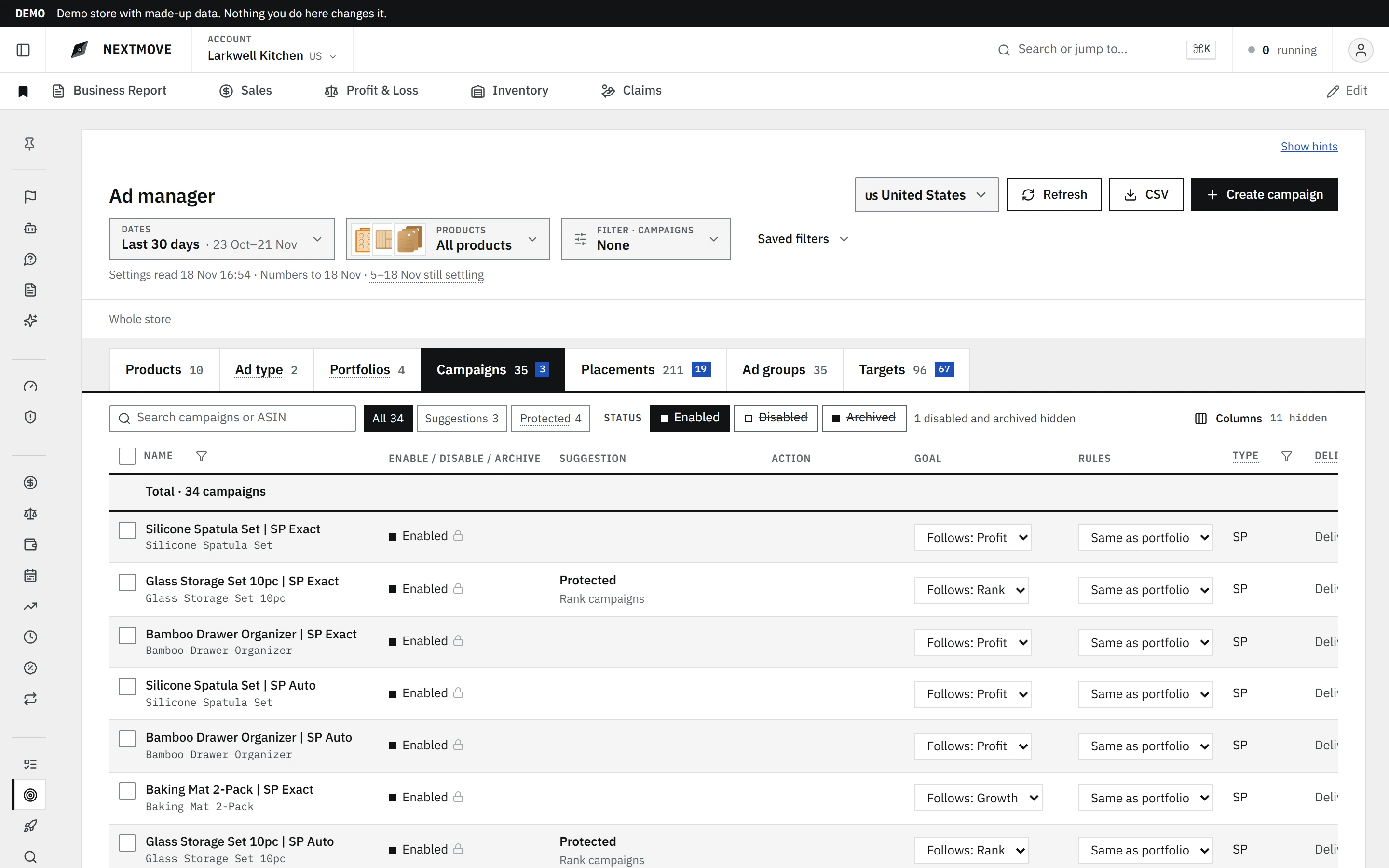
Every campaign in one table.
One store’s Amazon ads in one table, from your products down to each keyword and target, with Amazon’s figures and the target ACoS the rules hold each row to beside them. You change bids, budgets, placements, states and names where you read them.
| Seven tabs | Products, Ad type, Portfolios, Campaigns, Placements, Ad groups and Targets |
| Suggestions | The rules write their suggestions onto the rows, so you approve them where you see the figures |
| Your edits | A change you make here goes to Amazon when you make it |
| Safety | A bid or budget more than 3 times the old value asks first |
Ad manager Facts
One store’s ads, product to keyword
Changes made in Seller Central or another tool aren’t listed in History. Only what NextMove sent is.
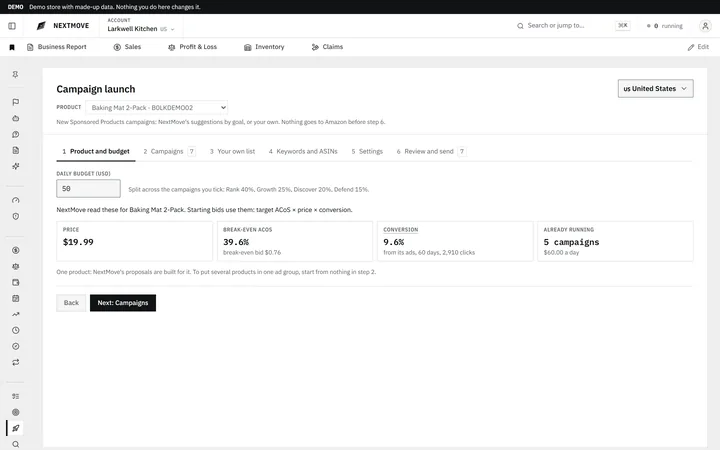
New campaigns from the product’s own numbers.
New Sponsored Products campaigns for one product, in six steps. NextMove proposes them by goal from the product’s own numbers, names them, sets each starting bid and splits your daily budget. You add your own keywords and ASINs, check every line and send them to Amazon in one go.
| Keywords | Ranked by the product’s own sales, never by search volume |
| Starting bid | Target ACoS × price × conversion, inside your min and max bids |
| No doubles | A campaign or line the product already has starts unticked, with the reason |
| Sending | Nothing goes to Amazon before you press Send in step 6 |
Launch Facts
Six steps, one product
A campaign needs about 10 clicks a day to learn anything. Spread too thin, each one runs out by midday.
Harvest what sells. Negate what doesn’t.
What shoppers typed before they clicked your ads, with what your rules say about each term and the buttons to act on it.
| Harvest | The term sells: add it as a keyword of its own, or an ASIN as a product target |
| Negate | The term costs without paying back: add it as a negative so the ads stop showing for it |
| Pause | Pause the keyword the term came from |
| Watch | Put it aside for now |
Search term Facts
Every term, with a verdict
Display has no search terms. Your title, bullet and brand words go on the protected list by themselves.
Rules that suggest, inside limits you set.
Rules judge your ads each day and suggest changes to bids, budgets, placements and search terms. Each row gets an objective, such as Profit or Launch, and the objective sets a target ACoS as a multiple of the product’s break-even. Without a target, rules hold rows to break-even.
| Profit | 0.7× | Aims for the most profit after ads |
| Growth | 1.0× | |
| Launch | 1.5× | |
| Rank | 2× | |
| Discover | 1.2× | |
| Defend | 0.5× | Holds top of search on your own brand terms |
| Clearance | — | No target |
Guardrail Facts
Three limits no rule can pass
Limits are in the store’s currency. Every preset you add starts off, so nothing new suggests until you switch it on.
Bids that rise and fall with the hours that convert.
Schedules that raise and lower your Sponsored Products bids by hour and weekday, by themselves, every hour, in the store’s local time. A schedule is a grid of 7 days by 24 hours; each cell holds a percent on the keyword’s normal bid.
| Off to start | “Run bid schedules” must be released for the store, then set to Auto in Settings |
| Inside the max bid | Every moved hour stays under the max bid in Goals & guardrails |
| Your hand wins | A bid you change by hand becomes the keyword’s normal bid |
| Logged | Every bid it moves is in History, with Schedule as who changed it, and can be undone |
Schedule Facts
The one thing that runs on its own
From ad sales by hour of the day, the agent raises bids from 6 to 10 pm and cuts them after midnight (example).
Advertising is in Pro.
Pro covers all six agents, Ads too. Advertising needs your Amazon Ads connection. The 14-day free trial includes it, with no card, so you can try it before you pick a plan.
| Ad manager | Every campaign, ad group and target in one table, with the suggestion beside it |
| Campaign launch | Pick a product and a budget; NextMove builds the campaigns from your best words |
| Search terms · Word performance | Every search term, read every day |
| Rules · Goals & guardrails | Bids stay inside your max bid and largest step |
| Bid dayparting | Bids that rise and fall with the hours that convert |
| Actions · History | Every ad change on a card, every card in History |
Advertising is only in Pro. On Starter and Growth its pages show what it does and a Move to Pro button. Compare every plan.
Pro Facts
Brands and teams with several accounts
Prices are in US dollars and exclude tax. Amazon.com, Amazon.ca and Amazon.com.mx today, each in its own currency.
Advertising questions
Is Advertising in every plan?
No. Advertising is only in Pro: $199 a month early bird for your first 12 months, then $299. The 14-day free trial includes it, with no card.
What do I need to use it?
Your Amazon Ads connection. NextMove connects through Amazon’s official Amazon Ads API, with Amazon’s own sign-in, and never asks for your password.
Will the Ads agent change my ads without asking?
Its suggestions wait for your Approve: bids, budgets, negatives and campaigns. Rules only suggest. Bid schedules are the one thing that runs on its own, and only if you switch them on. Pause all stops everything that runs on its own. A change you make yourself in Ad manager goes to Amazon when you make it.
What stops a rule from overspending?
Store limits no rule can pass: a max bid, a max daily budget and the largest step a rule takes, $5.00, $100 and 30% to start, in the store’s currency. Bid schedules stay under the max bid too.
Can I undo an ad change?
Yes, from Advertising, History. Undo checks Amazon first and won’t overwrite a later change. Amazon won’t turn an archived campaign, ad group, keyword or negative back on, so archiving can’t be undone, and something NextMove made, like a negative or a keyword, is undone by archiving it.
How do I know a change worked?
NextMove compares the 14 days before a change with the 14 days after and writes the result next to it: helped, no change, hurt or mixed. It is labelled “Before and after, not proof”, because the market moves too.
Which ad types does it cover?
Ad manager shows Sponsored Products, Sponsored Brands and Sponsored Display. Search terms covers Sponsored Products and Sponsored Brands, because Display has no search terms. Campaign launch and Bid dayparting are Sponsored Products only.
Which marketplaces?
Amazon.com, Amazon.ca and Amazon.com.mx today, each in its own currency. Europe and Japan come later.
The Advertising guides.
Each page has its own guide, with short videos, in the Guides.
| Ad manager | One store’s ads in one table, from products down to each keyword, changed where you read them. |
| Campaign launch | New Sponsored Products campaigns for one product in six steps, with bids and a budget split from its own numbers. |
| Search terms | What shoppers typed before they clicked your ads, with what your rules say about each term. |
| Rules | The rules that judge your ads each day and suggest changes, grouped by objective. |
| Goals & guardrails | What each campaign works toward, its target ACoS, and the limits no rule can pass. |
| Bid dayparting | Schedules that raise and lower your bids by hour and weekday, by themselves. |
Make your next move.
Start your 14-day free trial, no card. Advertising is included in the trial. Early-bird Pro is $199 a month for your first 12 months.